

Recommend
4.5
[Hands-on Reports]Sky247 Registration Guide
Guide on creating a Sky247 account with a welcome bonus.

Sign in with your mobile number
100% Secure Connection · Fast login
Go to https://4sky247.com/in/en for login

Now tap on blue button (login) button

Now you can enter Mobile number ' Email ID and password

Now you have logged in this is your full dashboard panel you can control everything from here

After clicking on my account you can view all you informed , promotion, can change settings etc

Find the Login ButtonLook at the top-right corner of the screen. Find the blue button labeled Login (located right next to the yellow Sign up button). Tap the Login ButtonTap directly on the blue Login button to open the sign-in page, enter your username and password, and access your account.

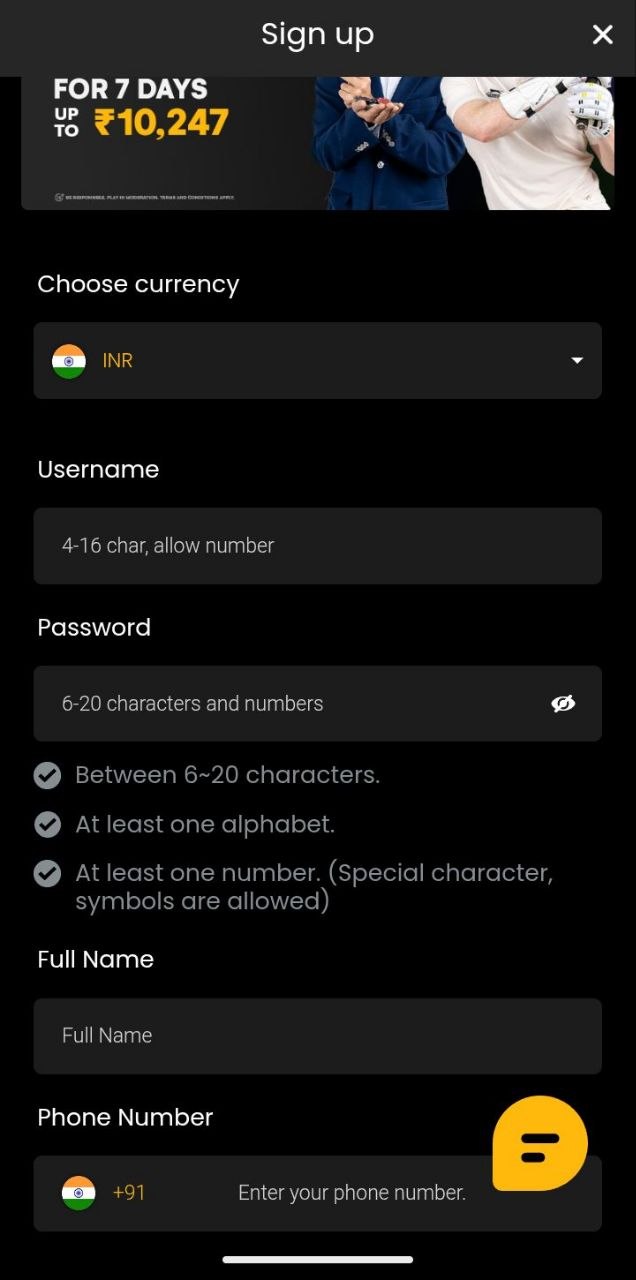
1.Choose Your Sign-Up Method</br> At the very top of the screen, select your preferred registration method by tapping either Phone, Email, or Account.</br>2.Select Your Currency:</br>Under the Choose currency section, ensure your local currency (such as INR with the Indian flag) is selected.</br>Tap into the Username box and type a unique name.It must be between 4 to 16 characters long and can include numbers.</br>4.Create a Secure Password:</br>Tap into the Password field and type a secure password. Make sure it follows these security rules:Must be between 6 to 20 characters long.Must include at least one alphabet letter.</br>Must include at least one number (special characters and symbols are also allowed).

Deposit Funds: Tap the yellow Deposit button at the top-right to add money. Check Offers: View active promos like the Referral Bonus right on the main banner. Choose Games: Access categories like Sports, Live Casino, Aviator, and Exchange below the banner. Bottom Menu: Quickly switch between Home, Promotions, Deposit, and My Account using the bottom navigation bar.

Select Deposit Tab: Make sure the Deposit tab is highlighted at the top of the screen. Choose Payment Method: Pick your preferred option (such as UPI, PAYTM, GPay, Local Bank, PhonePe, or crypto). Select Deposit Channel: Choose your preferred channel (e.g., UPI or Phonepe). Enter Amount: Tap a quick amount button (500, 1,000, 5,000, 10,000) or type an amount within the limit of ₹ 300.00 to ₹ 30,000.00.

Select Withdrawal Tab: Tap the Withdrawal tab at the top of the screen next to Deposit.</br></br>Choose ID Document: Select one of your accepted verification documents (Driver's License, PAN Card, Passport, or Identity Card).</br></br>Submit Details: Complete the required verification steps and tap Submit to unlock withdrawals.

Open the Sky247 app on your phone.</br>Look at the top right corner of the screen next to the yellow "Sign up" button.</br>Tap the blue Login button to open the account sign-in page.

You are now on the Login screen, with the Phone tab selected by default (you can also choose Email or Account tabs at the top if preferred). </br>Tap the Phone input box and enter your registered mobile number (pre-selected with the +91 India code). </br>Tap the Password field below it and enter your 6-20 characters and numbers password. (Note: If you forgot your password, you can tap the yellow "Forgot password?" link right below the field). </br>Once entered, tap the grey Login button at the bottom to access your account.

After successfully logging in, a Save password to Google? prompt will appear at the bottom of your screen. </br>This allows you to securely store your credentials in Google Password Manager for your account ([email protected]) so you won't have to re-enter them next time. </br>Tap the blue Save button on the bottom right (or tap Not now if you prefer not to save them).

After logging in, a Set Up Biometrics pop-up will appear on your screen, letting you use fingerprint or facial recognition for faster access in future sessions. </br>Tap the yellow Set Up Now button to configure your biometrics, or tap the "X" icon in the top right corner to skip this step. </br>You can also check the "Do not show again" box at the bottom if you prefer not to see this prompt again.

You are now fully logged in and looking at the main Sky247 dashboard home screen. </br>At the top right, you can now see the yellow Deposit button ready for adding funds. </br>At the bottom navigation bar, you can easily switch between Home, Promotions, Deposit, and My Account to manage your profile and start playing.

You are now on the Funds screen under the Deposit tab. </br>Under Select Promotion, you can keep it as "No_Bonus" or choose an available bonus option. </br>Under Payment Method, choose your preferred payment option (such as UPI, PAYTM, GPay, PhonePe, or cryptocurrency options like USDT and ETH). </br>Select your Deposit Channel (e.g., UPI or Phonepe). </br>Enter or select your desired Amount (ranging between ₹300.00 to ₹30,000.00, with quick-select buttons for 500, 1,000, 5,000, or 10,000) and proceed to complete your transaction.

You are now on the Withdrawal tab of the Funds section, where your Main Wallet balance is displayed at the top. </br>A notice states: "Please complete the verification below before you proceed with the withdrawal request." </br>Under ID Document, select and submit one of the accepted verification documents (Passport, Identity Card, PAN Card, or Driver's License) to unlock withdrawals and enable the Submit button.

This guide is provided for informational and educational purposes only. The app and platform mentioned in these steps involve financial transactions, deposits, and gaming/wagering. Please ensure that you comply with all local laws and regulations regarding online gaming and financial transactions in your jurisdiction. Always play responsibly and within your financial limits.
This is an independent, community-driven space for player payment channel reviews and experiences. While we provide intelligence on the fastest verified routes, we do not handle or process any financial transactions. For all secure deposits and withdrawals
Please use the verified [Official Secure Portal] above.
Guide on creating a Sky247 account with a welcome bonus.
Review to help others choose. Your voice matters.
The minimum deposit typically starts around ₹247 to ₹300 depending on your chosen payment method.